Influencer marketing has come a long way from picture-perfect posts and discount codes. It’s now a full-blown performance channel (and a really good one at that).
Brands are using powerful platform features to tap into creators’ voices, audiences, and credibility to give their paid campaigns extra pizzazz.
That’s where influencer whitelisting comes in.
Instead of running ads from your brand’s page and hoping people pay attention, whitelisting lets you run ads through a creator’s handle, blending the trust and authenticity people love with the targeting and optimization only paid social can offer.
Here’s how to do it well.
What Is Influencer Whitelisting?
Influencer whitelisting is when a creator gives a brand permission to run ads through their social account, so the ads show up as if the influencer is posting them, not the brand.
This goes by a few names depending on the platform (Partnership Ads on Meta and Spark Ads on TikTok), but most people still say “whitelisting” because… old habits.
Brands are really leaning into this tactic right now because trust is the ultimate currency in 2025 and beyond. Audiences are way savvier than they’ve ever been. They will absolutely scroll right past glossy, hyper-polished brands ads, but they’ll pause for creators they know and like.
You can basically take creator content that’s already converting organically, and put real budget behind it without losing that authentic feel (hello, best of both worlds).
Whitelisting vs Boosting vs Dark Posting
There are a few terms floating around this space, so let’s just take a mo to clarify the difference.
- Whitelisting: When a brand runs ads from the creator’s handle. It’s best for scaling creator content that’s already working.
- Boosting: When a creator “boosts” a post themselves or the brand boosts a creator post inside Ads Manager. It’s best for giving well-performing organic content a little extra push.
- Dark posting: When creator content is run as ads but the posts never hit the creator’s feed (posts only appear for the audiences you target). It’s best for A/B testing.
How Influencer Whitelisting Works on Different Platforms
Whitelisting works slightly differently depending on where you're running ads, and each platform insists on giving it a different name (because of course they do).
The principle stays the same, though. Creators grant brands permission to run paid ads using their handle and content.
- Meta calls it Partnership Ads
- TikTok calls it Spark Ads
Let’s look at each in practice.
Whitelisting on Meta & Instagram
Meta renamed whitelisting to Partnership Ads a couple of years ago, but the premise is wholly the same.
- The creator approves permissions (account-level or post-level).
- The brand can now run ads from the creator’s handle in Ads Manager.
- The brand chooses the post they want to promote or uploads new creator content.
- Ads run through the creator’s profile, but with the brand’s targeting and budget.
From the audience perspective, it just looks like an influencer post popping up in their feed. But behind-the-scenes, you can test audiences and track conversions.
Whitelisting on TikTok
TikTok calls whitelisting Spark Ads. The permission flow is almost identical to Meta, following the familiar steps below:
- The creator gives permission via a simple code (or linked account).
- The brand grabs that code and plugs it into TikTok Ads Manager.
- The brand chooses the video, sets targeting, adds a CTA, and runs the ad.
- The ad appears from the creator’s account.
Hands-On Setup for Influencer Whitelisting
Whitelisting sounds technical, but once you know the flow, it’s pretty straightforward. Here’s exactly how to set it up so you can start running creator-powered ads with confidence.
Meta Partnership Ads
Here’s how to bring a whitelisting campaign to life on Meta.
1. Align with your creator on the campaign brief and ad concept
Start by sitting down (virtually or in person) with your creator and getting totally synced on what you’re trying to achieve.
Here are some things to think about at this stage:
- What’s the campaign goal? (Conversions, awareness, app-installs?)
- What’s the story or idea? How will the creator naturally integrate the brand or product in their voice?
- What are the deliverables: how many videos/posts, what format (Reel, feed, story), what kind of creative style?
- What’s the timeline, rights/licensing, ad-run duration and budget?
Tip: Use Insense’s creative brief to lay out exactly what content you want creators to submit, including dimensions, format, and any references they can use as inspiration.

2. Have the creator grant you Partnership Ad permissions directly in Meta Business Manager
Once your brief is nailed, the creator needs to grant your brand permission so you can run ads from their handle. Here’s how that works:
- Go into Meta Business Suite / Ads Manager. The creator (or their manager) will enable “Partnership Ad” permissions for your brand. These can be at account-level (broad access) or post-level (specific posts only).
Psst… The creator’s Instagram (and Facebook Page if applicable) needs to be properly linked and set to a Professional/Creator account with Branded Content eligibility.
- Confirm the connection. In your brand’s Business Manager you should see the creator’s asset listed under “Partners” or “Ad Partnerships.”
💡Tip: Keep screenshots of permission acceptance and the date just in case you need to check it later.
3. Build the ad inside Ads Manager, making sure it runs under the creator’s handle
- In Ads Manager, click Create Campaign, choose your objective (e.g., Conversions, Traffic).
- Under “Identity” or “Ad Setup”, make sure the advertiser identity shows the creator’s handle (and/or brand handle depending on your approach) and toggle on “Partnership Ad”.
- Choose Use Existing Post (one of the creator’s organic posts) or Create Ad (upload new creative from the creator).
- Upload or select the creative, add copy, and choose a CTA.
- Set your placements, audience, budget and schedule just like any other ad.
4. Double-check tracking, disclosures, and placements
This is where attention to detail pays off.
- Tracking: Make sure the Meta Pixel (or equivalent measurement tool) is in place and firing.
- Disclosure: The creator’s content needs to comply with branded content rules (e.g., “Paid partnership” label) and when it becomes an ad, Meta automatically adds “Sponsored.”
- Placements: Decide where the ad will show (Feed, Stories, Reels, Facebook, Instagram). Make sure the creative format works for those placements (e.g., vertical for Reels).
- Permissions: Double-check that the right handle has ad run access and that permissions aren’t expired or pending.
5. Launch with a small budget to test performance before scaling
You’re ready to go live, but don’t throw all your budget at it just yet.
Start with a conservative budget and short timeframe (e.g. 3-7 days) so you can monitor how the creator’s handle, content, and targeting combo performs.
Then, track key metrics, like Click-Through Rate (CTR), Cost per Action (CPA), Video Completion Rate (if video), and Engagement (likes/comments).
If it works (low CPA, good engagement, on-target conversions), scale up. If not, tweak it. That might mean adjusting the audience, changing the creative, or even switching out creators.
TikTok Spark Ads
Here’s how to set up whitelisting via TikTok’s Spark Ads.
1. Request a Spark code from your creator for the selected post
Start by choosing which creator content you want to boost (ideally a post that’s already doing well).
Then ask the creator to:
- Go to their TikTok post, click the three dots menu, then tap Ad Settings or Promotion Settings.
- Toggle Ad Authorization on and agree to the terms.
- Copy the unique Spark code (or “authorization code”) and send it to you. This code is what gives your brand permission to use that post as an official ad.
💡Tip: Make clear in your brief how long you’ll be running the boost, what the budget is, and whether the creator’s handle will show.
2. Enter the code and build the ad in TikTok Ads Manager under the creator’s handle
Now you jump in on the brand side:
- Log into your TikTok Ads Manager and go to Assets, then Creative, then Spark Ads.
- Paste the creator’s Spark code, which will pull up the video that you’re authorized to run. Confirm it’s the correct post.
- Pick your objective (traffic, conversions, app installs, whatever aligns with your brief).
- Under “Identity” or “Ad Account”, make sure the ad is tied to the creator’s account (so it runs from their handle.
3. Add UTMs or tracking links and refine captions and CTAs if needed
- Make sure your destination link includes UTM parameters so you can track performance in Google Analytics (or whatever you use).
- If needed, tweak the caption or CTA to match your campaign goal.
- Confirm the ad will show the correct CTA button in TikTok (e.g., “Shop now”, “Visit site”).
💡Tip: Double-check specs. Spark Ads inherit the original post’s creative but you still want to make sure nothing changes when it’s boosted.
4. Launch the campaign, then watch early metrics like CTR, CPM, and engagement
At this point, your ad is live, and you should be keeping a close eye on things.
In the first 24-72 hours, monitor key numbers, like CTR (Click-Through Rate), CPM (Cost per Mille/impressions), and engagement (likes/comments/shares).
Then, compare these results to your benchmarks. Is the engagement higher than typical ads? Are completion rates or click-rates looking good?
Similarly to Partnership Ads, if the performance is looking strong, scale up your budget, broaden targeting, or extend the run. If not, pause and tweak.
How to Run Whitelisting with Insense
If it feels like there are a lot of steps in the whitelisting process, that’s because there are.
But with Insense, you can streamline all of this and avoid a ton of back-and-forth getting permissions and reviewing ad content.
Here’s a rundown of how whitelisting works on Insense.
Create a campaign in Insense
Firstly, start a new campaign. Under Campaign Goal, choose either Awareness & Reach or Conversions & Sales. Then, chooseTikTok or Meta, depending on where you want to run your ads.

Using the creative brief template, you can outline the deliverables you want, goals, format, and any other information creators might need.
It’s also helpful to specify at this point that you’ll need permission for Meta Partnership Ads or TikTok Spark Ads.
Connect with your chosen creators
Either put out a brief and wait for creators to apply or reach out to your chosen creators directly.
If you’re running Spark Ads, the creator can send you their code through the Insense direct chat feature so you can activate your TikTok partnership with them.

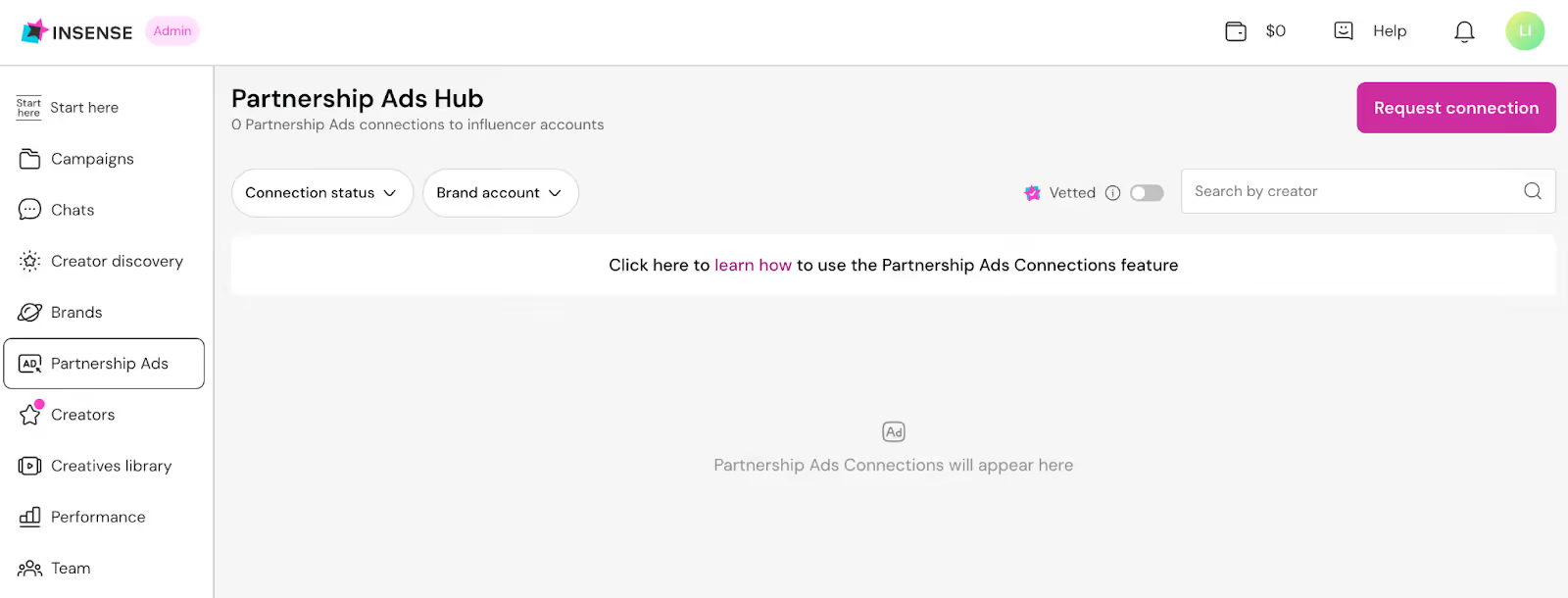
For Partnership Ads, you’ll need to link your Facebook with the creator and then request the connection through Insense. Do this by choosing the creator’s Facebook profile you want to connect with.
Once you’ve connected with a creator, they’ll show up in your Partnership Ads hub.
Review and approve content
Within Insense’s chat feature, you can review and approve content from creators to make sure it hits the brief. You can also hit the “request edits” button if something needs to be changed.
Get whitelisting permissions and set up ads
Creators can approve ad rights directly in Insense and it’ll automatically sync permissions to your connected ad account.
When content has been approved, go into either Facebook’s Ad Manager or TikTok Ad Manager (depending on where you’re running your whitelisted ads), and set up a campaign as you would normally.
From there, you’ll be able to select the creator’s content you want to promote (you’ll need to add the code the creator sent you if you’re setting up a Spark Ad).
Then, set your budget and treat the campaign as you would any other, just don’t forget to make sure it’s running from the creator’s handle and not your own.
If you want to make whitelisting feel… easy (yes, really), Insense lets you do everything in one place, from briefs and content approvals to Spark codes and Partnership Ad access.
Want to poke around? Try Insense for free, or book a quick demo if you’d rather have a guided tour.
FAQs
What is influencer whitelisting, and how is it different from boosting?
Influencer whitelisting is when a creator gives a brand permission to run paid ads from their handle, using their content. Boosting is when you simply “boost” an existing post with limited targeting and control.
Is “allowlisting” the same as whitelisting?
Yes, it’s the same idea but with different wording. Some brands prefer “allowlisting” for inclusivity reasons, but in practice, both terms mean giving brands permission to run ads from a creator’s account.
How do Meta Partnership Ads relate to whitelisting?
Meta Partnership Ads are essentially Meta’s updated, official name for whitelisting. It’s the same concept (running ads from a creator’s handle) just with a more formal workflow inside Ads Manager.
How does TikTok Spark Ads compare?
TikTok Spark Ads are TikTok’s version of whitelisting. The creator authorizes their post, and the brand promotes it through Ads Manager, so the ad runs from the creator’s profile instead of the brand’s.
What should be in a whitelisting contract?
Include the key details upfront: permission to run ads, usage terms, duration and geos, whether edits are allowed, budget, compensation, and required disclosures (like “paid partnership”).