Whitelisting lets you ride on the coat tails of an influencer’s name while enjoying the handy features of Ads Manager. It’s a great way to bridge the gap between influencer marketing and performance marketing.
Influencer posts are powerful.
But they have their limits.
Organic reach caps out and even the best content slows down eventually.
That’s why brands are turning to whitelisting on Instagram (now officially called Meta Partnership Ads).
What Is Whitelisting on Instagram?
Whitelisting on Instagram is when a content creator gives a brand permission to run ads using their Instagram identity.
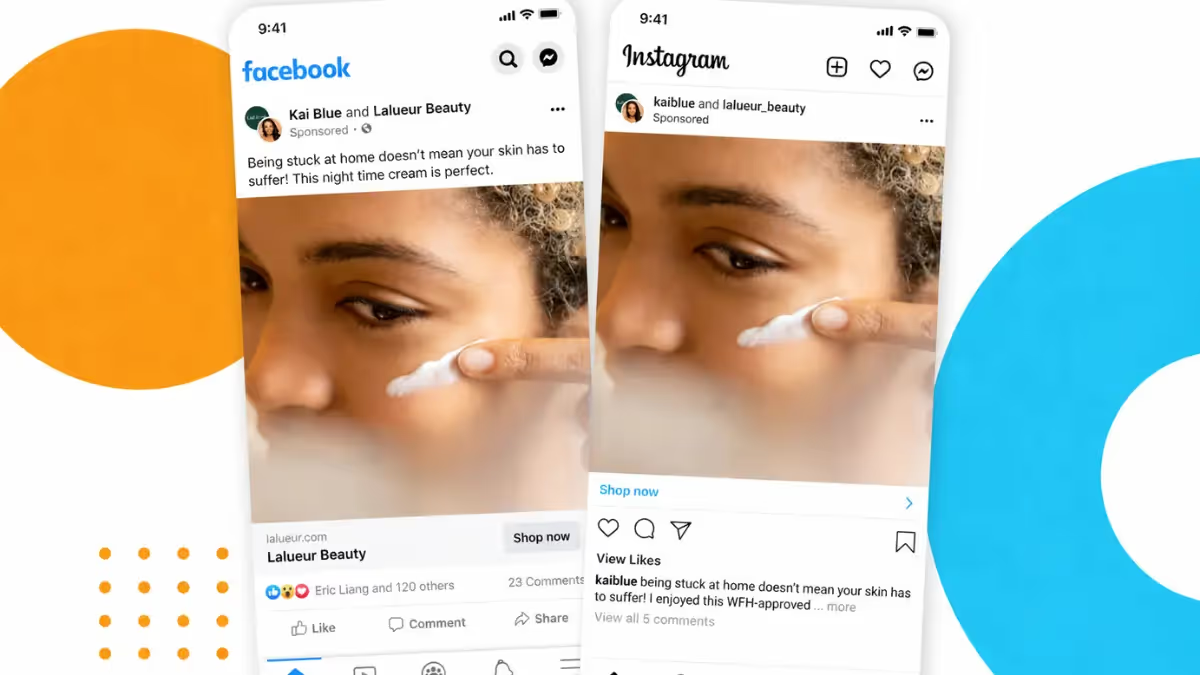
You’re running proper ads that show up as if they’re coming directly from the creator (with their handle, their profile photo, their voice), while you control the targeting, budget, and optimization behind the scenes.
On Instagram and Facebook, Meta now calls these Partnership Ads. Same concept that used to be known as “whitelisting,” just with a more official name.
Whitelisting vs Allowlisting
You might have heard the term allowslisting tossed around too. It’s basically the same concept but with a slightly friendlier name.
“Allowlisting” puts the emphasis on permission. Creators are literally allowing brands access to their Instagram account.
So whether your team calls it whitelisting or allowlisting, the idea’s the same. A creator licenses a brand to tap into their social identity for paid ads, giving you the best of both worlds:
- Authentic creator credibility ✅
- Paid media performance ✅
Creator Licensing on Instagram
Creator licensing is the formal process of getting permission to use a creator’s content (and their handle) in your paid ads.
In simple terms, it’s the agreement that allows you to run ads from a creator’s account or use their content in paid media. Instead of just posting organically and calling it a day, the creator grants you advertising rights so you can turn that content into high-performing ads.
When you license a creator’s content, you’re securing the right to:
- Run ads through the creator’s handle
- Use their name, likeness, and content in paid campaigns
- Control targeting, budget, and optimization
- Potentially repurpose the content across placements (depending on what’s agreed)
The key thing here is permission. Nothing runs without the creator actively granting access through Meta’s Partnership Ads setup. That keeps everything transparent and above board, which is exactly how it should be.
Whitelisting and Creator Licensing
You’ll often hear whitelisting and creator licensing used interchangeably… and, yes, in practice, they’re closely linked.
But there’s one key distinction:
- Whitelisting is the tactic (running paid ads through a creator’s Instagram handle).
- Creator licensing is the agreement that makes that tactic possible.
The reason many teams prefer the term creator licensing is because it more accurately reflects what’s actually happening.
We’re not talking about a toggle you switch on in Ads Manager here. We’re talking about a formal agreement where a creator grants you the right to use their content, name, image, and handle for ads.
Creator licensing includes things like the terms involved, timeframes, deliverables, usage rights, scope, sometimes even exclusivity. It’s a legal contract.
So, while both terms do describe the same ecosystem, creator licensing emphasizes the legal and strategic layer behind the execution.
Branded Content Tool vs Creator Licensing
Even though both Instagram’s Branded Content Tool and creator licensing involve boosting the creator’s post, the main difference between them is how useful they are to marketers like you.
The branded content tool limits the way marketers or brands can optimize the creator’s content.
It was essentially designed for disclosure and to appease the FTC. So, basically creators can tag a brand as a paid partner on an organic post (you’ve seen it before, the little “paid partnership with…” label at the top.
Creator licensing on the other hand (or whitelisting/Partnership Ads) gives you more control over creator content (a.k.a. a better deal for you).
Here’s the difference:
- Branded Content Tool: The creator posts organically. The brand gets visibility and can sometimes boost that specific post (if the creator allows it).
- Creator licensing: The brand runs ads through the creator’s handle with full targeting and budget control.
When you license content, you’re not just boosting an existing post to the creator’s existing audience. You can also target cold audiences, build lookalikes, retarget website visitors, and optimize for conversions, all while the ad looks like it comes from the creator.
Another key difference is that boosting is limited through the Branded Content Tool. Licensing unlocks full Ads Manager functionality.
This can work well for you when you layer it up, e.g.:
- Branded Content Tool for transparency and organic collabs.
- Creator licensing for paid performance and scaling content.
How To Whitelist Influencers on Instagram
Influencer whitelisting on IG (aka running Partnership Ads) is really just a mix of creator collaboration and paid media setup.
Here’s how you can get started.
Choose and brief your creator
First things first, you need the right creator.
Go beyond follower count here and look for someone whose:
- Audience matches your ideal customer
- Content style feels natural for paid ads
- On-camera presence is good and trustworthy
Tip: Use Insense’s creator marketplace to search and filter creators by follow count, age, location, and category.
You can add good-fit creators to a list and invite them to create content for you.
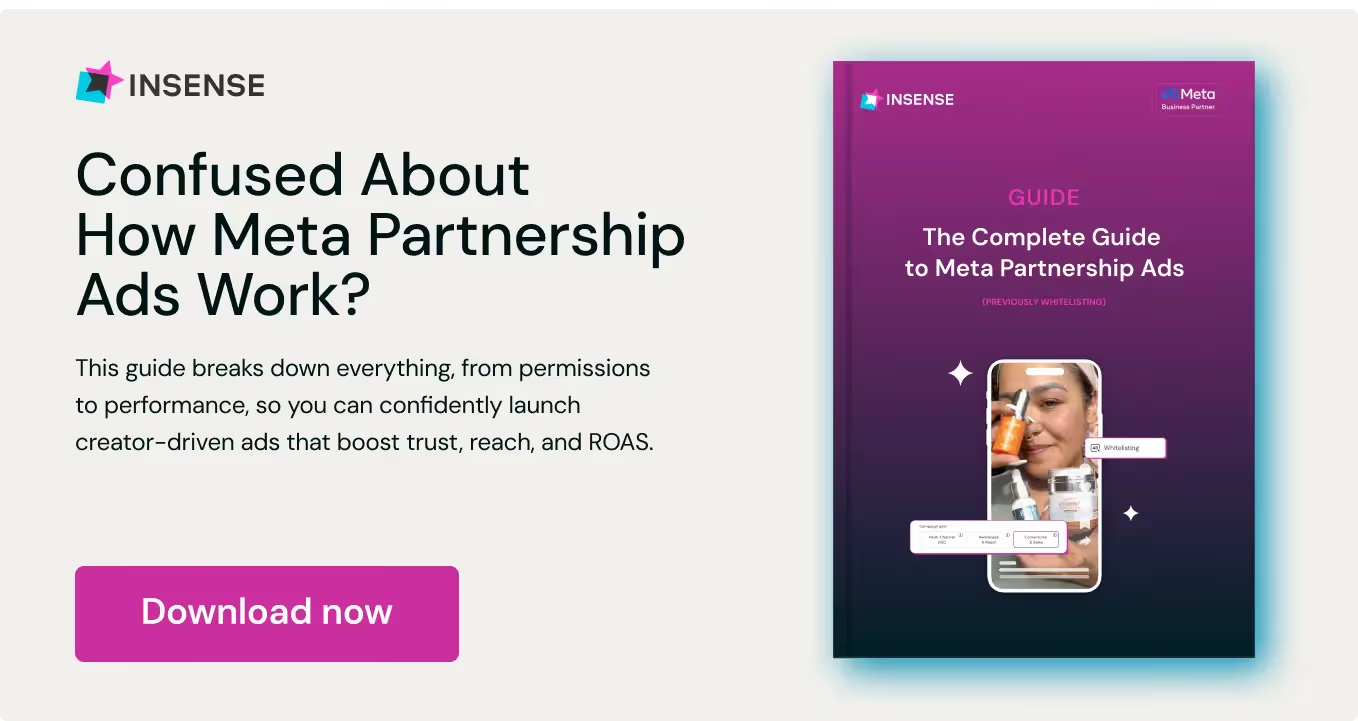
Once you’ve got a list of relevant creators, brief them properly. Again, you can use Insense’s detailed brief creator to highlight what deliverables you want, any messages you need conveying, and any other important information that creators need to know.
Try adding info like:
- The goal (sales? Signups? App installs?)
- The hook you want to test
- Key selling points
- Mandatory talking points
- Ad-style deliverables (UGC-style video, testimonial, demo, etc)
Let creators know early on that this is for Instagram licensing/whitelisting rather than a regular organic post.
Insense’s brief builder lets you highlight that your campaign is for Partnership Ads early on.
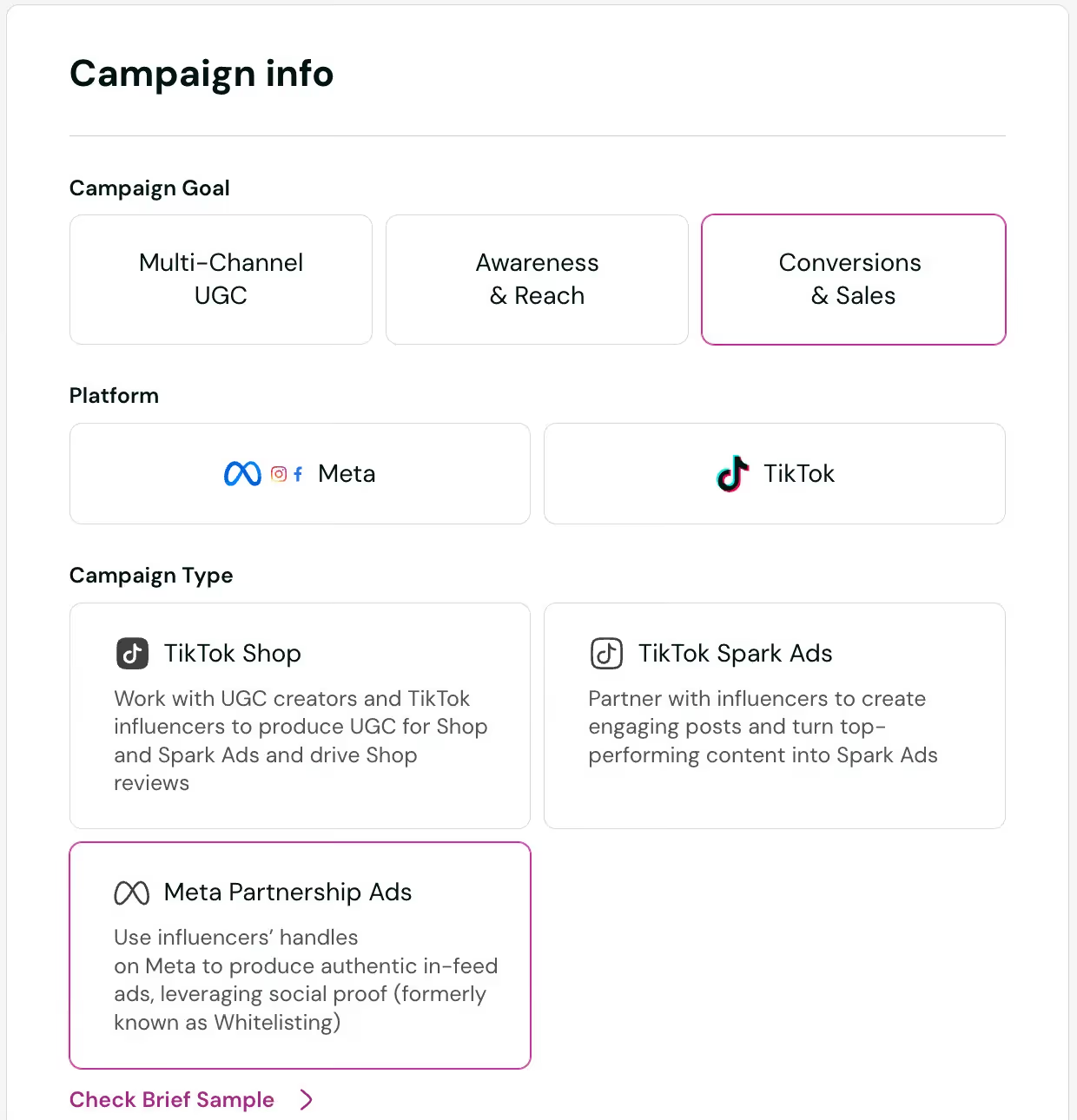
Request permissions from the creator
Once creators have delivered their content, you’ll need them to grant you ad permissions.
Here’s how to do that:
- The creator generates a Partnership Ad authorization in their Instagram settings.
- They share the ad authorization code (or approve your business account directly).
- You connect that authorization to your Meta Ads Manager.
Alternatively, you can request a Partnership Ads connection via Insense. Do this via the “Request Partnership Ads” button in the creator’s profile once you’ve hired them.
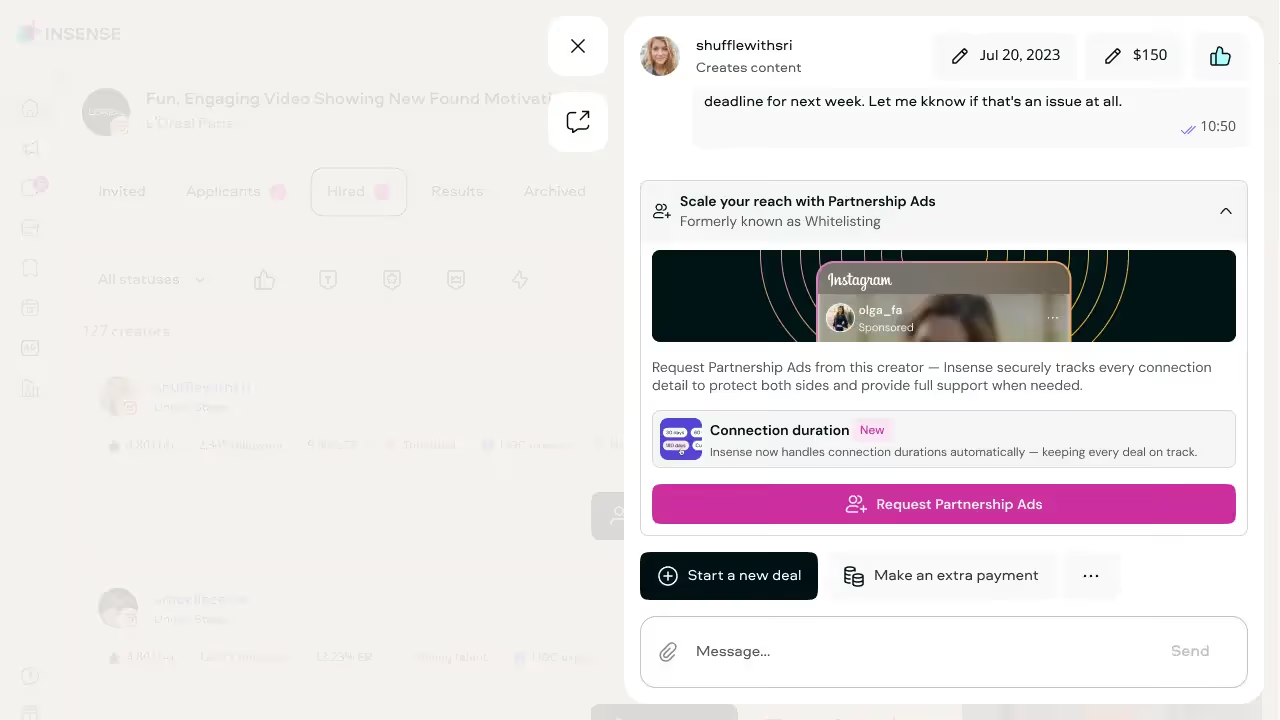
You can see all your Partnership Ads connections in one place in your Insense dashboard, as well as pending connections and those that have expired.
Note that this permission is time-bound, so you need to define how long you can run ads from their account. This is where it’s really important to have clear licensing terms in your contract.
Build the ad under the creator handle
Now the fun can begin.
Inside Ads Manager, you can:
- Select your chosen creator
- Upload their creative (or use an existing post)
- Write or refine the ad copy
- Add your own CTA
- Set your budget
- Choose your targeting
Make sure you toggle the switch to enable Partnership Ads.
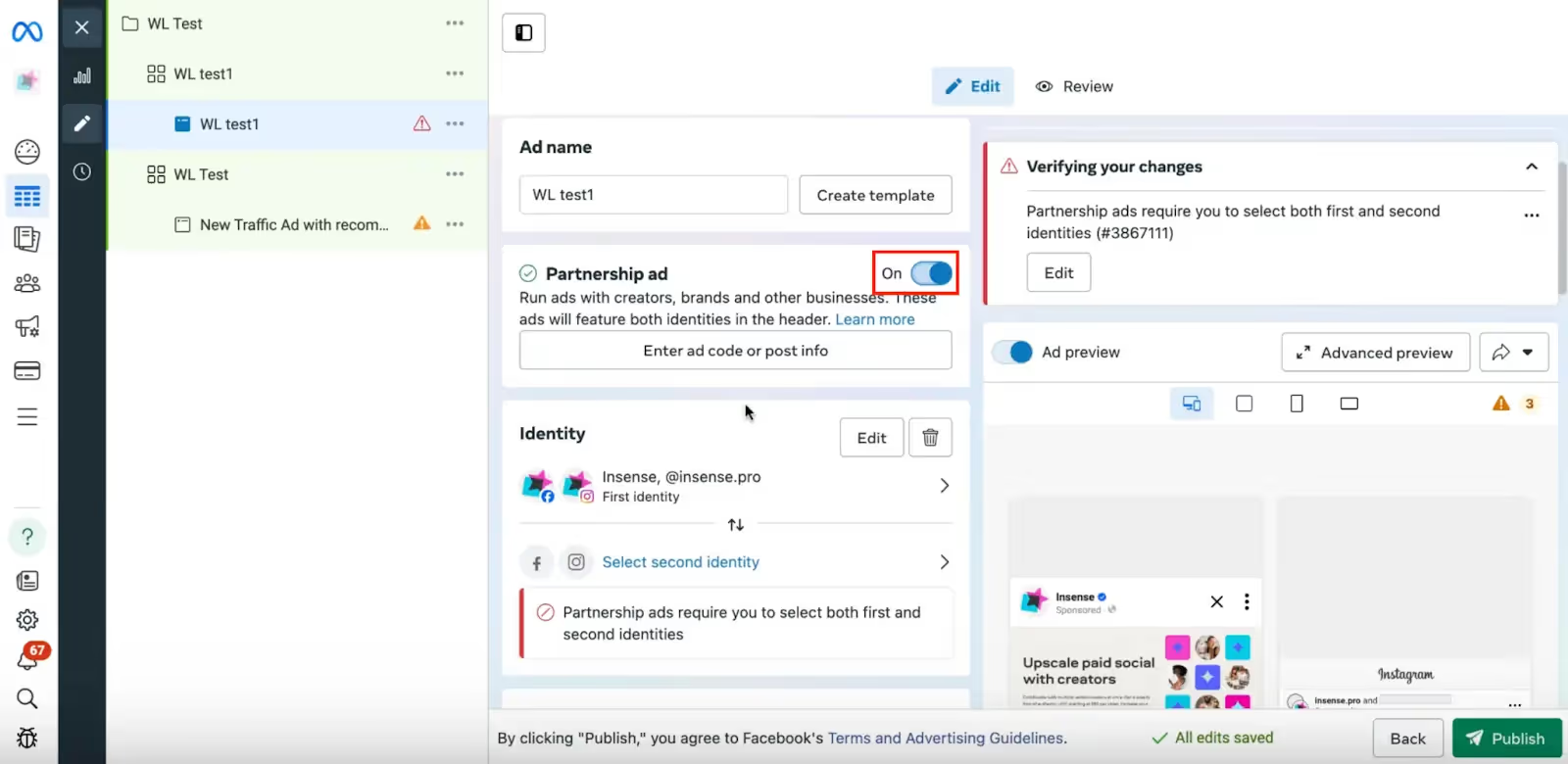
Once you’ve done this, you’ll be able to select the creator as a second identity:
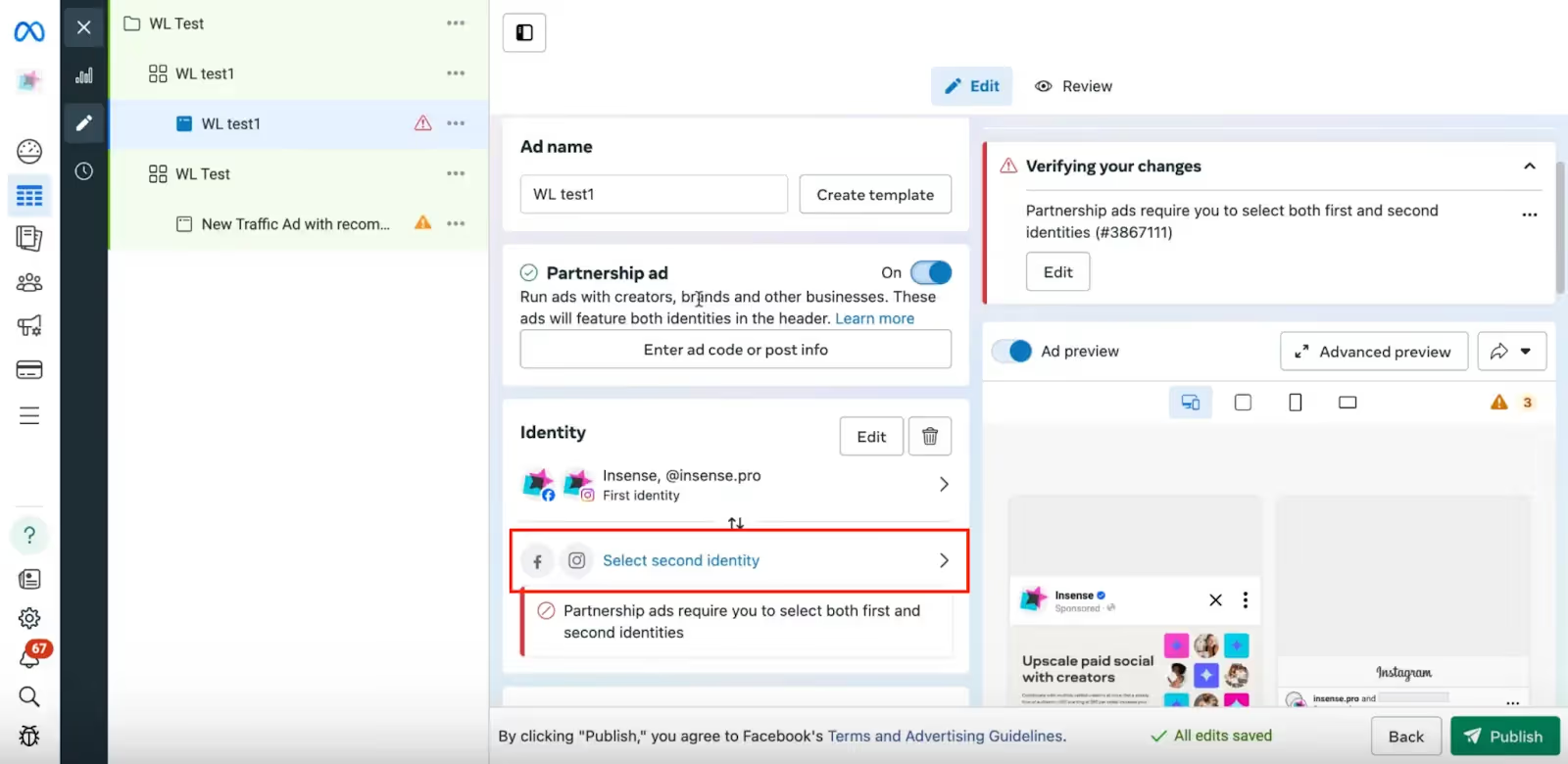
The ad runs directly from the creator’s handle so it feels native and trustworthy, but you still have full control over lookalike audiences, retargeting, testing placements, etc.
Disclosures and policy checks
Before you hit publish, make sure:
- You’ve correctly applied the branded content disclosure (a.k.a. the “Paid partnership with… label)
- The ad complies with Meta’s advertising policies
- Any claims are substantiated (esp. in health, finance, or beauty)
- You’ve added proper UTM tracking links
- Your landing page matches the promise of your ad
You still have a responsibility to be compliant with Meta’s ad policies even though the ad is coming from a creator’s account.
Monitor and Optimize
When the ads are live, keep a close eye on them (you can monitor them in your campaign dashboard in Insense).
Pay particularly attention to:
- Hook rate (are people stopping the scroll to watch your ad?)
- Hold rate (are they actually watching?)
- Click-through rate
- Cost per acquisition
- Return on ad spend
If something isn’t working or you’re not getting the results you want, test a new hook, change the thumbnail, tighten up the audience, or refresh the copy.
The beauty of Instagram influencer whitelisting is that you don’t need the creator to repost every time you want to test something. Once you have licensing rights, you can optimize like any other paid campaign.
Then, once you find a winner (or winners), scale them. Pump more money into them, make similar ads, or lean harder into collabs with that particular creator.
Instagram Whitelisting Ad Formats and Placements
One of the biggest pros of whitelisting is you’re not stuck with one format.
Once you’ve got your licensing in place, you can run ads across multiple placements and choose the format that works best for you and your goals.
Let’s break down what works (and when to use each format).
Reels, Stories, Feed
Each type of Insta post has a different vibe and can perform differently depending on what you’re trying to achieve.
- Reels. Great if your goal is reach or awareness because they feel native and blend into the scroll. Reels ads work especially well for problem/solution hooks, product demos, before-and-afters, relatable storytelling, and trending UGC.
- Stories. Great for getting direct responses. People are already used to tapping, swiping, and clicking on Stories, so you’re basically relying on that behavior to transfer to your ads. They perform well for limited-time offers, promo codes, flash sales, retargeting campaigns, and clear, single-focus CTAs.
- Feed posts. Great for social proof and credibility. Whitelisted ads appearing in-feed under a creator’s handle feel like a normal post, making them ideal for testimonials, educational breakdowns, product walkthroughs, founder-style storytelling, and longer captions that explain the benefits.
Creative tips for whitelisted ads
Now let’s talk about what actually helps these ads perform (because, let’s be real here, whitelisting only works if the creative works).
Here’s what to focus on:
- Nail the first 3 seconds. Your hook should call out a pain point, make a bold claim, start mid-sentence, or visually disrupt the scroll (e.g. “I wasted $300 before I found this” or “Stop buying this if you have dry skin”).
- Keep it native. The more your content looks like an ad, the worse it usually performs. Encourage creators to film on their phone, use natural lighting, speak casually, avoid overly scripted videos, and skip any heavy brand references in the first frame or two.
- Write strong captions. Most people won’t read a long caption in a Reel or Stories, so your core message should live in the video itself. That said, it’s a good idea to use the caption to reinforce benefits in the caption, add social proof, include any urgency claims, and clarify your CTA.
- Include clear, direct CTAs. Tell people exactly what to do when they watch your ad (e.g. “Tap to try it”, “Use my code”, or “Click below to get 20% off”).
- Build testing into your campaigns. Don’t pin all your hopes on one video. Instead, test multiple hooks, different opening visuals, variations in pacing, short vs slightly longer edits, and different CTAs to see what combos work best.
Benefits of Creator Licensing/Whitelisting for Brands
When done well, whitelisting is a great way to blend influencer marketing with real performance strategy.
Here’s why brands love it.
- It builds trust. Ads instantly feel more human when they show up under a creator’s handle. Feels more like a recommendation than an ad, which in turn builds more trust and credibility.
- It reaches more people. Yes, you can reach a creator’s organic following with Meta Partnership Ads, but you can also use Ads Manager’s powerful targeting capabilities to create lookalike audiences, retarget website visitors, and reach people with specific interests or demographics.
- It gets you broader exposure. Even great, organic influencer posts have a ceiling. Creator licensing lets you take content that performs well and extend it way beyond organic reach.
- It’s cost-effective. One of the biggest perks of Instagram influencer whitelisting is the cost efficiency. Creator-licensed ads often deliver lower CPMs, lower CPCs, and stronger CTRs because they don’t feel like traditional ads and blend naturally into feeds.
- It gives you more control and flexibility. You can adjust targeting, test new audiences, swap out hooks, refine copy, add custom CTAs, and optimize ads in real-time all while the ad still runs from the creator’s handle.
- It’s easy to repurpose. Creators are really good at making content that feels natural. They know how to talk to camera, grab attention, tell a quick story, and make products feel relatable. When you license this content, you’re getting a high-performing creative that can be repurposed and scaled across many campaigns.
Benefits of Creator Licensing/Whitelisting for Creators
Instagram creator licensing can be a really smart move for creators too (obviously, otherwise it wouldn’t be a thing).
When it’s done well, it helps creators earn more and grow faster without flooding their feed with sponsored post after sponsored post.
Here’s how it benefits creators:
- It opens a new revenue stream. Instagram licensing lets creators move beyond a single post fee. Instead of getting paid once for an organic post, they can charge for ad usage rights, renewals, and extended licensing periods.
- It boosts their reach and reputation. Ads put creator content in front of new potential followers, plus consistently showing up in paid campaigns signals a certain level of professionalism.
- It attracts new followers. When someone sees a paid ad from a creator’s account and likes what they see, they might click through to the creator’s profile and follow.
- It lets them keep control. Good licensing agreements give creators control over their content by letting them approve the final content or any major copy changes.
- It makes them more credible. Working with reputable brands through licensing shows that a brand trusts a creator’s voice, the content performs well, and that a creator is comfortable operating at a paid media level.
Insense Helps With Instagram Whitelisting and Creator Licensing
Finding creators, contracts, usage rights, ad permissions, performance tracking… there are a lot of moving parts involved in whitelisting.
Insense is built specifically to help brands streamline influencer campaigns and activate creator licensing all in one place.
Here’s what makes it especially helpful for whitelisting:
- Creator marketplace. Easily discover and vet creators based on niche, audience data, performance history, and past ad experience.
- Built-in licensing workflows. Manage usage rights and clearly define ad permissions from the start, so there’s no confusion about timelines or scope.
- Partnership Ads support. Seamlessly coordinate Meta Partnership Ads (formerly whitelisting) and handle the authorization process.
- Content approval system. Review, request edits, and approve creative before it ever goes live.
- Performance tracking. Monitor how licensed creator ads are performing and optimize accordingly.
- UGC and paid amplification in one place. Source high-performing creator content and immediately activate it as paid ads.
In short, Insense connects the dots between influencer marketing and paid media.
Instead of treating creator campaigns and performance ads as separate strategies, it helps you turn creator content into scalable, measurable growth.
If you’re ready to turn creator content into high-performing paid ads, you can try Insense for free or book a demo to see exactly how it works.
FAQs
Is creator licensing (whitelisting) bad for influencers?
No, not when it’s done properly. With clear contracts, defined usage rights, and approval over final content, Instagram creator licensing can actually be a great revenue stream and growth lever for influencers. The key is transparency and making sure the creator is comfortable with how their name and content are being used.
How do I request access to a creator’s ad account?
You don’t access their ad account directly. Instead, the creator grants ad permissions through Meta’s Partnership Ads authorization process and shares an authorization code (or approves your business account). This allows you to run ads from their handle without sharing passwords or account logins.
Does creator licensing hurt the creator’s algorithm performance?
No. Partnership Ads run as paid media and don’t negatively impact a creator’s organic reach or algorithm performance. In many cases, the additional exposure can actually drive new profile visits and followers.
Is creator licensing the same as boosting posts?
Not exactly. Boosting is a limited version of paid promotion with fewer targeting and optimization options. Creator licensing (Partnership Ads) gives brands full Ads Manager control, including advanced targeting, lookalikes, retargeting, and conversion optimization.
How much does it cost to license a creator’s content?
It costs an additional 15%-30% of the creator's based fee.
.avif)